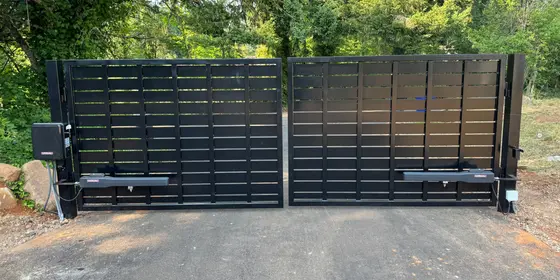
Gate entry is a set of layers, not one device
Most gates we set up end up with more than one way in, by design. The household needs speed, guests need a way to reach you, and a business needs to know who came through and to cut one person off without changing everything. Start by listing who uses your gate in a normal week: family, a dog walker, delivery drivers, a farrier, tenants, employees. That list picks your layers better than any brochure.
- Remotes and vehicle-mounted transmitters: the fastest entry for the people who live there. The weak spot is a lost remote, which works for whoever holds it.
- Standalone keypad with codes: nothing to hand out but a number. Good for guests and service people. Codes spread, so plan on changing them.
- Audio or video intercom that calls a phone: a visitor presses call, you talk, and you open the gate from wherever you are. Video lets you see who it is first.
- App-based and cloud-managed entry: users open from their own phones, and a manager adds and removes people from an app or browser. Some cloud systems carry a subscription, so ask what it covers.
- Cards and fobs: the right tool when many people need in. One lost fob can be shut off without touching anyone else's.
Getting out is half the system
Buyers spend an hour choosing how people get in and forget that every one of those people also has to leave. Without free exit, every driver inside needs a remote, a code, or a walk to the gate. The standard answer is a vehicle detector that opens the gate when a car rolls up from the inside. On pavement that is a loop, a coil of wire cut into the surface that senses the metal of a vehicle. On gravel there is nothing to cut, so we bury an exit wand beside the drive instead, far enough inside that nobody can trigger it from the street and clear of the gate's own travel.
- Exit detection is not safety protection. Photo eyes and contact edges are what protect people under UL 325, and a reversing loop keeps the gate off a car in its path. Plan them together.
- Adding a loop later means cutting finished pavement, so plan it before a new driveway is poured or paved.
Wired, wireless, or cellular: what each needs at the gate
The entry device has to talk to the gate operator, and if it calls a phone, it has to reach the outside world too. That decides what you need at the post. A wired keypad runs low-voltage cable to the operator, usually in conduit, and it is the least fussy option once that path exists. A wireless keypad runs on its own batteries and talks to the operator by radio, which saves a trench but means battery changes and a clear signal path. Video asks the most: steady power and a solid data connection.
- Wireless keypad: a good fit for an existing gate with no path for wire. Distance, metal, and heavy tree cover cut into range.
- Wired network intercom: one cable from the house or shop can carry power and data. The most dependable way to run video when the gate is not too far from the building.
- Wi-Fi: rarely reaches the end of a long drive with any strength. A point-to-point wireless bridge from the house is the usual fix.
- Cellular unit: needs power at the gate and usable coverage at that exact spot. Check signal at the post, not at the house. Hillsides and tall firs change coverage over a short distance.
Old telephone entry boxes and the end of copper
For years, the standard box at shared and commercial gates was a telephone entry panel: a visitor pressed a button, the panel dialed a resident over a copper landline, and the resident pressed a key to open the gate. Carriers are retiring traditional copper landline service, and when that line goes, the panel cannot call anyone, even if its keypad and board are fine. Codes stored in the panel may still open the gate, so the box looks healthy until a visitor tries to call. A sound panel can often dial over the cell network with a cellular adapter. A failing one gets replaced on the same post.
What keeps working when the power or internet is out
Every entry method leans on something, so know what yours leans on before the first ice storm. The gate operator needs power: battery backup carries it through a limited number of cycles, and the manual release covers the rest. Codes and fobs stored in the entry unit work with no internet at all, as long as the unit has power. Anything that rings a phone or opens from an app needs a live connection and pauses when it drops. That is why we rarely build a gate around one method alone.
- Remotes talk straight to the receiver at the operator, so an internet outage does not touch them.
- Operator backup batteries age quietly. Have them tested before winter.
- Intercom and network gear that does not share the operator's backup can ride through short outages on a small backup power supply.
- Accessories powered from the operator, like a video unit or lit keypad, drain its backup battery faster in an outage.
- The manual release is always there. Know where the key is before you need it.
Replacing an old unit, and where the post belongs
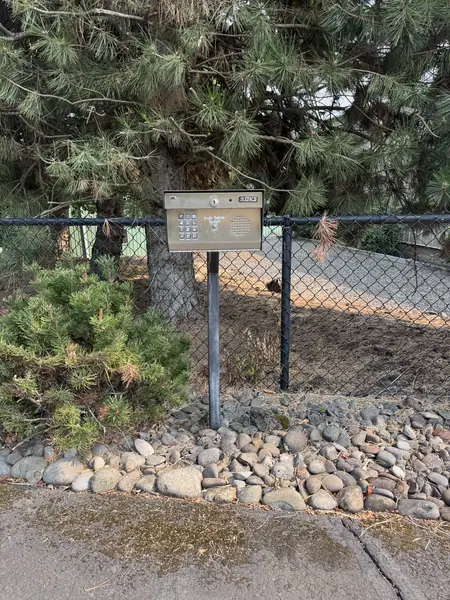
Swapping a tired keypad or entry box is often the cheapest upgrade a gate can get, because the post, and often a wiring path to the operator, is already there: the new unit mounts where the old one stood. Near Stafford, we replaced an aging keypad on a rural driveway's gooseneck post with a Cellgate entry unit, keypad and camera in one housing, with no new trenching, in about two hours. In Gladstone, an old entry box gave way to a Cellgate video intercom with a camera, keypad, and call button, and the swap took about an hour and a half. With no conduit, the choices are wireless, cellular, or a new trench.
- Reach from the driver's window: a driver should not have to open the door. A gooseneck post angles the unit toward the window.
- Off the road: far enough back that a waiting car sits clear of traffic while the gate opens.
- Out of the gate's path: never where a swing leaf sweeps or a slide panel travels.
- Away from the moving gate: UL 325 calls for entry controls placed so the person using them cannot touch the gate while it moves. A keypad within arm's reach of the gate is a red flag.
Matching the mix to your property
Most of the entry setups we build fall into one of three patterns, from Tualatin to Clark County. Start from the one closest to yours and adjust for who actually comes through the gate. If there is no power at the gate yet, settle that first, because it shapes what the post can run and whether a camera unit is realistic.
- Single home: remotes for the household, a keypad for guests and service people, and an exit loop. Add a video intercom if you get regular deliveries or want to open for people while you are away.
- Acreage: remotes, a keypad on a gooseneck at the road, and an exit wand on the gravel. With no network at the gate, a cellular keypad-and-camera unit avoids a long data run. Check signal at the post first.
- Small multi-tenant or business entrance: individual fobs, cards, or codes, an intercom or directory for visitors, and a cloud system to add and remove people without a site visit. Free exit by loop, and an entry log for the day someone asks who left the gate open.
Frequently asked questions
Should everyone share one keypad code, or get their own?
Give people their own codes wherever the keypad allows it. A shared code lives on in old texts and with former employees, and changing it means telling everyone again. Individual codes let you delete one person without disturbing the rest, and on systems that log entries you can see which code opened the gate and when. At minimum, keep the household code separate from the one you hand out.
What should I do if a remote or fob goes missing?
Treat it like a lost house key. A fob on an access system is the easy case: deactivate that one credential and issue a new one. Remotes depend on the receiver. On many residential receivers, the clean fix is to clear its memory and re-pair the remotes you still have, which shuts out the missing one.
If I have app entry, do I still need remotes?
Most households keep them. An app is great for opening the gate for someone else, but finding it on your phone at the end of the driveway is slower than a button on the visor. Remotes also do not care whether the internet or the cell network is up. We usually set up app entry as an added layer, not a replacement.
How do keypads and intercoms hold up to Northwest rain?
Well, if they are built and mounted for it. Look for a sealed housing, a hood over the keys, and wiring that enters from below so water cannot run in. Backlit keys matter here, since much of the winter commute happens in the dark. The failures we see most are water past a tired gasket, corroded connections, and worn buttons, mostly on units that were never sealed right.
Can someone figure out my gate code from the keypad?
Sometimes, from wear. On a code that has not changed in years, the keys you press most get shiny or faded, and that narrows the guessing. Changing codes now and then, using longer codes, and replacing a visibly worn keypad all help. Keypads that lock out after repeated wrong entries, where yours offers it, slow guessing further.
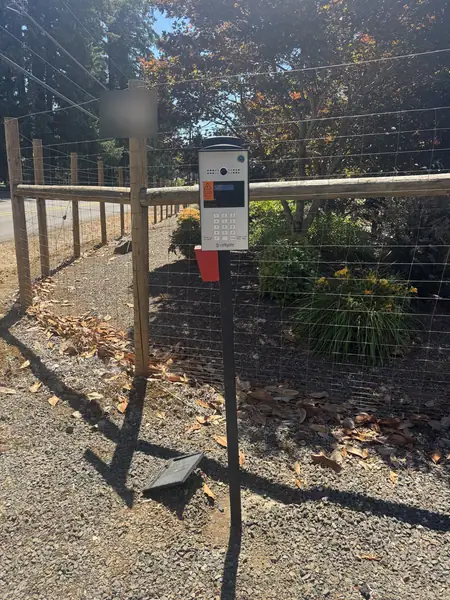
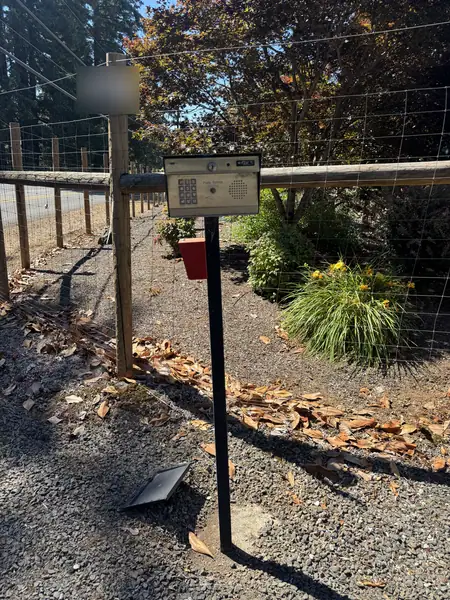 Before
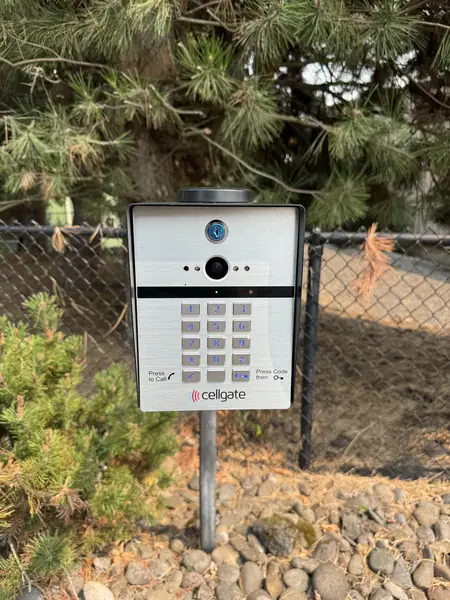
 Before